
Blog > Practice Management > How to Evaluate an EHR Before Your Free Trial
How to Evaluate an EHR Before Your Free Trial: A Checklist for Behavioral Health Providers
To evaluate an EHR before a free trial, behavioral health providers should compare the system across five core areas: clinical documentation, billing and insurance, compliance and security, scheduling and practice management, and implementation support. A structured EHR evaluation checklist helps you test whether the software fits your actual workflows before you commit to a platform.


Last Updated: July 23, 2026


Key Takeaways
- A free trial is most useful when you know what workflows, questions, and criteria you want to test before you start.
- Behavioral health practices should evaluate EHR software differently than general medical practices because documentation, billing, compliance, scheduling, and care team workflows are more specialized.
- The five most important areas to compare are clinical documentation, billing and insurance, compliance and security, scheduling and practice management, and implementation and support.
- During a demo, ask vendors to show real workflows, including a complete session note, denied claim process, data migration steps, contract terms, and support response expectations.
- During the trial, test your actual workflow: schedule appointments, document a realistic note, review billing steps, try the patient portal, contact support, and compare overall fit.
- Use the same checklist for every EHR you evaluate so you can make a fair, consistent decision before committing to a platform.
Contents
- Why EHR Evaluation Is Different for Behavioral Health
- EHR Evaluation Criteria for Behavioral Health Practices
- Behavioral Health EHR Evaluation Criteria at a Glance
- EHR Demo Questions to Ask Before Starting a Free Trial
- EHR Free Trial Checklist: What to Test Before You Commit
- How to Evaluate EHR Fit by Practice Type
- Common Mistakes to Avoid When Choosing Behavioral Health EHR Software
- EHR Red Flags to Watch for During a Demo or Free Trial
- Final Behavioral Health EHR Evaluation Checklist
- Frequently Asked Questions
Most clinicians don’t choose an EHR through a formal evaluation process. They choose based on a colleague’s recommendation, a sales demo that hit the right notes, or a free trial that happened to be convenient when they were ready to switch. That’s not a criticism — it’s just how decisions get made when everyone involved is also trying to run a practice.
The problem is that a free trial only tells you what you ask it to. If you sign up without a clear sense of what to evaluate, you’ll spend two weeks clicking through a calendar and a note template, decide it “seems fine,” and find out three months post-implementation that it doesn’t actually handle group therapy billing or your supervisor’s co-signature requirements.
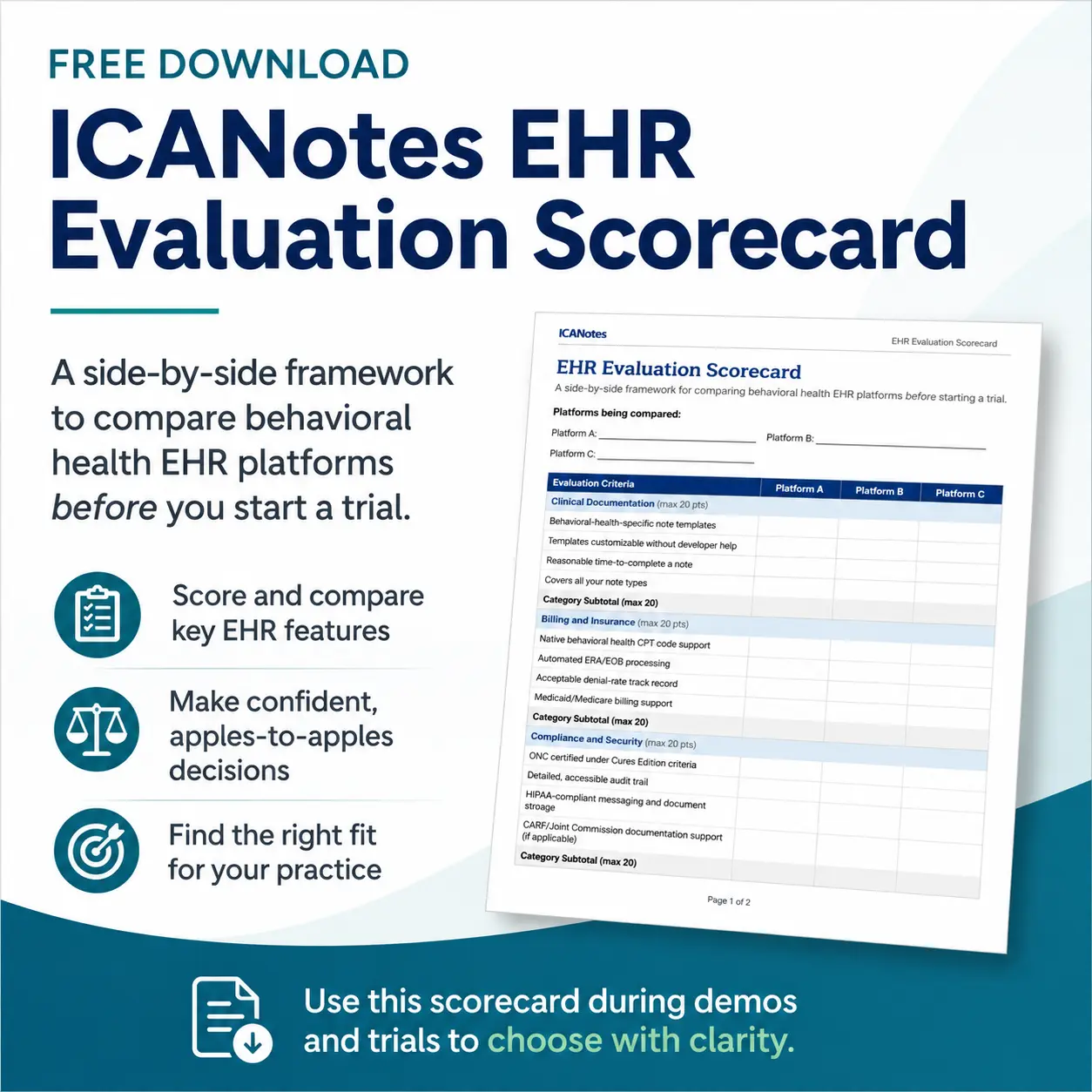
This piece is the preparation step most people skip. Before you start a trial of any EHR — ICANotes included — here’s a structured way to evaluate behavioral health EHR software so the trial actually answers the questions that matter, instead of just confirming that the software loads.
Why EHR Evaluation Is Different for Behavioral Health
Generic “how to choose an EHR” advice is written for primary care, and it shows. It tells you to check for e-prescribing and lab integrations, which matter, but it skips the things that actually break behavioral health workflows.
Behavioral health practices have documentation requirements general medical software doesn’t anticipate: psychiatric evaluations, biopsychosocial assessments, treatment plans with measurable goals, and progress notes that have to stand up to payer audits and licensing board review. Billing is more complex too — time-based psychotherapy codes, add-on codes for crisis or interactive complexity, group session billing where one note has to support multiple claims, and telehealth modifiers that vary by payer. Compliance obligations layer on top, from 42 CFR Part 2 protections for substance use records to state-specific rules on psychotherapy note confidentiality. And the day-to-day workflow patterns — recurring group sessions, intake-heavy onboarding, multidisciplinary care teams, co-signature chains for supervisees — don’t map cleanly onto software built for a family medicine clinic.
None of this means general EHR advice is wrong. It means it’s incomplete. The five areas below are built specifically around what behavioral health practices need to check that generic guidance leaves out.
EHR Evaluation Criteria for Behavioral Health Practices
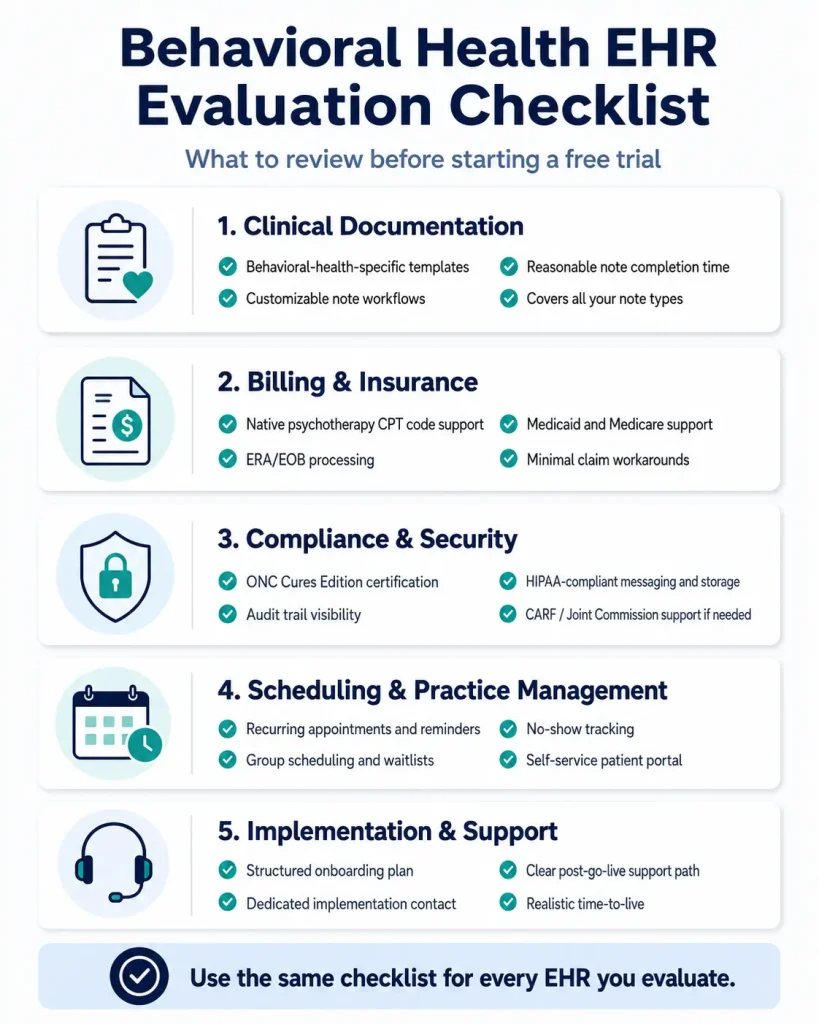
Before you request a login, get clear on what you’re actually testing. These are the five categories worth a hard look — in the sales materials, in the demo, and eventually in the trial itself.
1. Clinical Documentation
This is where clinicians spend the most time, so it’s worth the most scrutiny.
- Does it include behavioral-health-specific note templates — psychiatric evaluations, therapy progress notes, treatment plans, discharge summaries — or are you adapting templates built for somewhere else?
- Can you customize templates to match your practice’s documentation style without needing a developer?
- How long does a typical session note actually take to complete, end to end?
- Does it support every note type your practice uses, including the less common ones (group notes, supervisee co-signature workflows, intake assessments)?
2. Billing and Insurance
Documentation and billing live in the same system for most EHRs, so weaknesses here compound.
- Does it support behavioral health CPT codes natively — psychotherapy codes, add-on codes, group therapy billing — without manual workarounds?
- How does it handle ERA/EOB processing, and how much of that is automated versus manual?
- What do denial rates look like for practices similar to yours on this platform?
- Does it support Medicaid and Medicare billing, including the documentation requirements those payers enforce?
3. Compliance and Security
This is the category clinicians most often take on faith. Don’t.
- Is the platform ONC certified under the current Cures Edition criteria?
- What does the audit trail actually show, and how far back does it go?
- How does it handle HIPAA-compliant messaging and document storage — both internally and with clients?
- Does it support the documentation needs of CARF or Joint Commission accreditation, if your practice is accredited or pursuing it?
4. Scheduling and Practice Management
Scheduling looks simple in a demo. It gets tested for real once you’re running your actual caseload.
- Does the system handle group therapy scheduling — recurring groups, waitlists, multiple clinicians?
- Can it manage recurring individual appointments, automated reminders, and no-show tracking without manual rebooking?
- Is the patient portal genuinely self-service, or does staff still need to intervene for scheduling and intake?
5. Implementation and Support
This is the category most often skipped in a demo and most often regretted after go-live.
- What does onboarding actually look like — is there a structured plan, or do you figure it out as you go?
- Is there a dedicated implementation resource, or do you get routed through a general support queue?
- What does ongoing support look like after go-live, once the onboarding team moves on?
- What’s the typical time-to-live for a practice your size, and what does that timeline depend on?
Behavioral Health EHR Evaluation Criteria at a Glance
| Evaluation Category | Key Features to Evaluate | Why It Matters |
|---|---|---|
| Clinical documentation | Behavioral health templates, treatment plans, group notes, co-signatures | Reduces documentation burden and supports audit-ready notes |
| Billing and insurance | Psychotherapy codes, group billing, ERA/EOB processing, Medicaid/Medicare support | Helps reduce workarounds and claim delays |
| Compliance and security | ONC certification, HIPAA messaging, audit trails, 42 CFR Part 2 support | Protects sensitive behavioral health data |
| Scheduling and practice management | Recurring visits, group scheduling, reminders, patient portal | Supports real-world mental health workflows |
| Implementation and support | Onboarding, migration, live support, post-go-live help | Reduces disruption during the switch |
EHR Demo Questions to Ask Before Starting a Free Trial
A demo is a sales conversation, which means the answers matter less than what they reveal. Bring these into any demo:
Ask How the Platform Handles a Full Session Note
“Walk me through documenting a full session note, start to finish.” This tells you whether the documentation workflow is actually fast or just looks fast when a sales representative drives it.
Ask How Denied Claims Are Resolved
“What does a denied claim look like in this system, and how do we fix it?” Vague or deflected answers usually mean billing transparency is weaker than the pitch suggests.
Ask What Data Migration Includes
“What does data migration from our current system actually involve?” Listen for specifics—what data types transfer, what does not, and who does the work. “We’ll figure that out during onboarding” is not an answer.
Ask About Contract Terms and Data Export
“What are the contract terms if we need to leave—notice period, data export, and early termination?” A platform confident in its product will answer this without hedging.
Ask How Support Works After Go-Live
“If we submit a support ticket at 4 p.m. on a Friday, when do we hear back?” This is the question that predicts your experience eighteen months from now, after the sales team is gone.
EHR Free Trial Checklist: What to Test Before You Commit
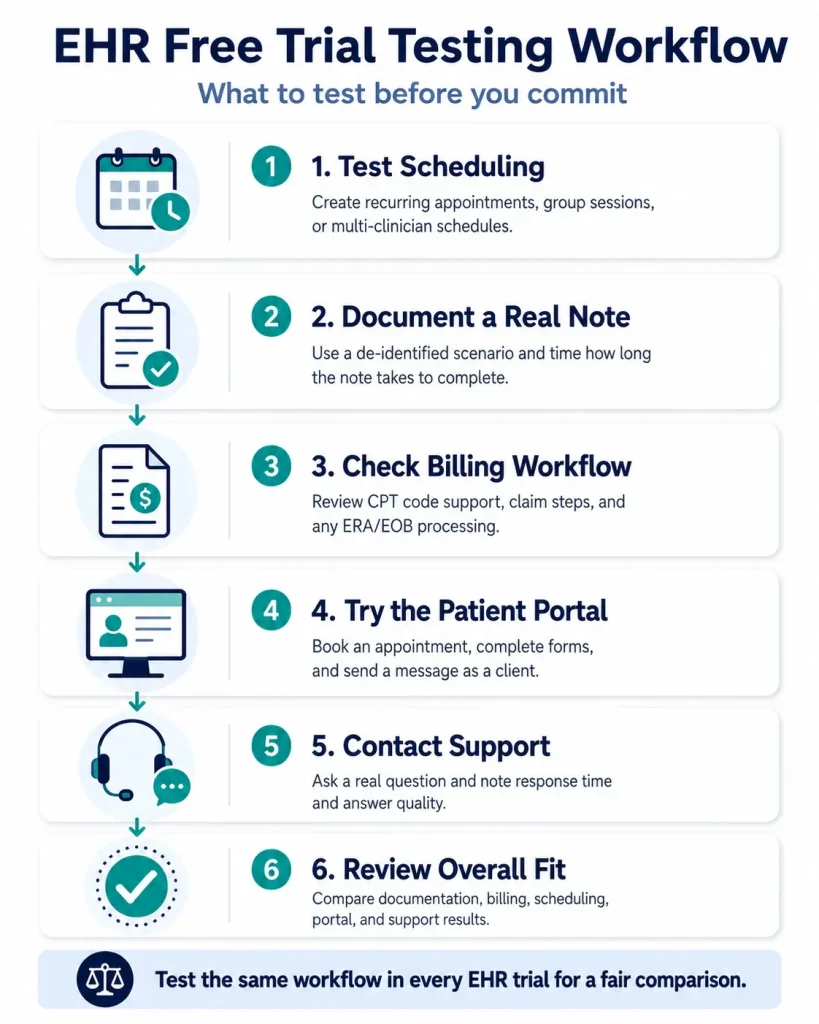
Once you’re in your trial account, don’t just click around — work through your actual workflow. Treat this as your EHR free trial checklist:
- Document a session note end-to-end, using a real (de-identified) scenario from your practice, and time it.
- Submit a test claim if the trial allows it, and see how far the billing workflow actually goes. Some platforms restrict live claim submission or e-prescribing during a trial — ask up front what’s included so you know what you’re actually testing.
- Try the patient portal as a client would, not just as an admin. Book an appointment, fill out an intake form, send a message.
- Contact support with a real question and note how long it takes to get a useful answer — not just an acknowledgment.
- Test the scheduling workflow for your specific practice type — group sessions, recurring clients, multiple clinicians, whatever your actual calendar looks like.
A trial that ends with “it seemed fine” hasn’t told you anything. A trial that ends with “I documented a real note, billed a real-looking claim, and got a support answer in under four hours” has.
How to Evaluate EHR Fit by Practice Type
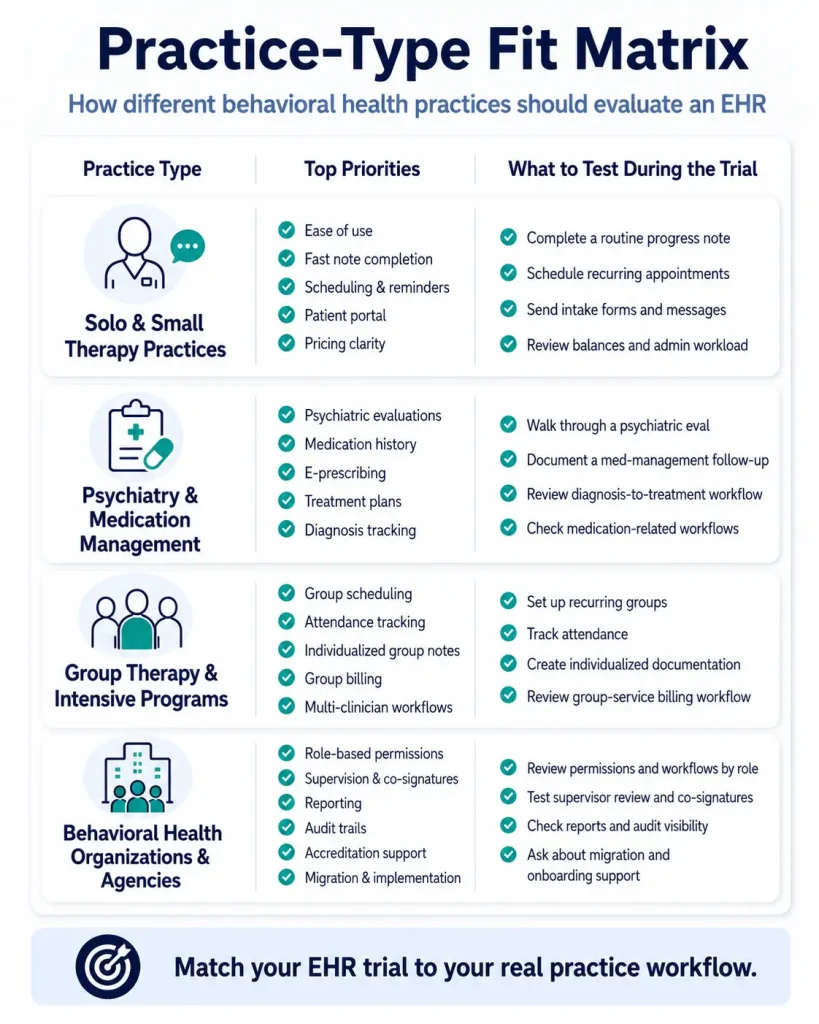
Not every behavioral health practice needs the same EHR features. A solo therapist, a psychiatry practice, and a multi-site behavioral health organization may all need documentation, scheduling, billing, and compliance support, but they will stress-test those features in different ways. Before you start a free trial, think about which workflows are most likely to create friction in your specific setting.
Solo and Small Therapy Practices
Solo and small therapy practices should pay close attention to ease of use, note speed, scheduling, reminders, billing simplicity, and the patient portal experience. If you do not have a large administrative team, the EHR needs to reduce work rather than create a second system to manage.
During a trial, test how quickly you can complete a routine progress note, schedule recurring appointments, send intake forms, collect client information, and follow up on unpaid balances. Also look closely at pricing clarity. A platform that looks affordable at first can become less attractive if essential tools require paid add-ons or third-party integrations.
Psychiatry and Medication Management Practices
Psychiatry practices and medication management providers should evaluate whether the EHR supports the clinical workflows that go beyond standard therapy notes. That may include psychiatric evaluations, medication history, treatment plans, e-prescribing, lab workflows, diagnosis tracking, and documentation that supports medical decision-making.
During the demo or trial, ask the vendor to walk through a full psychiatric evaluation and a follow-up medication management visit. Pay attention to how easily the system connects diagnoses, medications, treatment plans, and follow-up documentation. If the workflow feels like a generic progress note with medication fields added later, it may not fully support psychiatric care.
Group Therapy and Intensive Programs
Practices that offer group therapy, intensive outpatient programs, partial hospitalization programs, or other structured services should evaluate scheduling, attendance, group documentation, individualized notes, and billing very carefully. Group workflows often reveal whether an EHR was truly built for behavioral health or simply adapted from general medical software.
During a trial, test how the system handles recurring groups, multiple clinicians, attendance tracking, individualized client documentation, and claims tied to group services. If staff have to duplicate notes, track attendance in a spreadsheet, or manually reconcile group billing, those workarounds can become significant operational burdens.
Behavioral Health Organizations and Agencies
Larger behavioral health organizations should evaluate role-based permissions, supervision workflows, reporting, audit trails, data migration, accreditation support, and implementation planning. In these settings, the question is not only whether one clinician can write a note easily. It is whether the platform can support multiple roles, locations, programs, and compliance requirements without creating inconsistent workflows.
During evaluation, ask how the system handles supervisor review, co-signatures, program-specific documentation, staff permissions, reporting needs, and historical data migration. Also ask what implementation support looks like for an organization your size. A strong EHR should help your team standardize workflows without forcing every program into the exact same documentation pattern.
Common Mistakes to Avoid When Choosing Behavioral Health EHR Software
Choosing an EHR is easier when you know what to look for, but it is just as important to know what to avoid. Many practices do not make the wrong decision because they ignored the EHR entirely. They make the wrong decision because they tested the wrong things, asked broad questions, or assumed important details would be easy to fix later.
Choosing Based Only on the Sales Demo
A polished demo can make almost any system look simple. The real question is whether the workflow still feels simple when you are using your own note types, billing requirements, staff roles, and scheduling patterns.
Ask the vendor to show realistic workflows, not just the cleanest version of the software. If possible, use your own de-identified examples during the trial so you can see how the system performs with the kinds of cases your practice actually manages.
Testing Only the Calendar and Note Template
Scheduling and documentation are important, but they are not the whole EHR experience. A platform may look easy during a quick review of the calendar and a single progress note, then become frustrating when you test billing, portal workflows, reporting, supervision, or support.
During the trial, move through a complete workflow: schedule the appointment, complete documentation, review the treatment plan, test billing steps, use the patient portal, and contact support. That gives you a more accurate picture of daily use.
Forgetting to Evaluate Billing Workflows
For behavioral health practices, billing is often where generic EHR workflows break down. Time-based psychotherapy codes, group billing, add-on codes, telehealth modifiers, Medicaid requirements, and payer-specific documentation rules can all create friction if the platform was not designed with behavioral health in mind.
Do not stop at asking whether the system “does billing.” Ask how it handles the specific billing scenarios your practice uses most often. If the answer depends on spreadsheets, manual workarounds, or disconnected third-party tools, factor that into your decision.
Assuming Support Will Be Easy to Reach After Go-Live
Support may not feel urgent during a demo, but it becomes critical during implementation, billing issues, staff onboarding, and system updates. A platform can have strong features and still create frustration if your team cannot get timely help when work is blocked.
Before choosing an EHR, ask what support looks like after onboarding. Find out whether support is available by phone, chat, ticket, or email; whether you get access to live help; and how urgent issues are handled.
Ignoring Data Migration and Exit Terms
Many practices focus on how easy it will be to start using a new EHR, but they do not ask enough about how data will move into the system or how it can be exported later. That can create problems during implementation or make it harder to leave if the platform is not the right fit.
Ask what data can be migrated, what cannot, who handles the migration, how long it usually takes, and what format your data is available in if you ever decide to leave. Clear answers here are a sign of a more transparent vendor relationship.
Comparing Platforms Without Using the Same Checklist
It is difficult to compare EHR systems fairly if every demo and trial is evaluated differently. One platform may impress you with documentation, another with scheduling, and another with pricing, but that does not tell you which one best fits your full workflow.
Use the same evaluation checklist for every platform. Score each EHR across clinical documentation, billing, compliance, scheduling, patient portal functionality, implementation, support, and total cost. A consistent framework makes the final decision less subjective and easier to explain to the rest of your team.
EHR Red Flags to Watch for During a Demo or Free Trial
Some signs are worth treating as deal-breakers, not minor friction:
- Billing workflows that require third-party workarounds — spreadsheets, separate clearinghouses bolted on, manual claim scrubbing — are a sign the core billing engine wasn’t built for behavioral health claims in the first place.
- Note templates that need heavy customization just to be clinically usable suggest the platform was adapted from general medical documentation rather than designed around behavioral health workflows.
- Vague answers about data migration or contract exit terms are a preview of how the vendor will treat you once you’re a customer instead of a prospect.
- Support that’s only available by ticket, with no path to a live person when something is actively blocking your work, will cost you real time during go-live and every system update after.
Final Behavioral Health EHR Evaluation Checklist
For each platform, mark whether the requirement is fully supported, partially supported, or not supported. If a vendor cannot clearly demonstrate an item during the demo or trial, treat it as unresolved until confirmed. Use this to score every platform you’re evaluating, ICANotes included, on the same terms.
Clinical Documentation
Billing and Insurance
Compliance and Security
Scheduling and Practice Management
Implementation and Support
Demo and Trial Results
If a platform scores well across all six categories, you’re not just evaluating in theory anymore — you’re ready to confirm it in practice. That’s what the trial is for. Start a free trial with ICANotes and run it against this exact checklist.
Frequently Asked Questions About Evaluating a Behavioral Health EHR
Recent Posts





Dr. October Boyles
DNP, MSN, BSN, RN
About the Author
Dr. October Boyles is a behavioral health expert and clinical leader with extensive expertise in nursing, compliance, and healthcare operations. With a Doctor of Nursing Practice (DNP) and advanced degrees in nursing, she specializes in evidence-based practices, EHR optimization, and improving outcomes in behavioral health settings. Dr. Boyles is passionate about empowering clinicians with the tools and strategies needed to deliver high-quality, patient-centered care.