
Blog > Practice Management > Step-by-Step EHR Data Migration Guide
EHR Data Migration: What Behavioral Health Practices Need to Know
EHR data migration means securely moving patient records from one system to another. For behavioral health providers, this is more than just a technical step. It is essential for maintaining continuity of care, protecting sensitive data, and ensuring compliance. In this guide, you'll learn what EHR data migration is, how it works in mental health settings, the most common challenges, and how to ensure a smooth, compliant transition.


Last Updated: December 17, 2025

Behavioral health records contain detailed clinical information like therapy notes, assessments, medications, and care plans. These records often cover many years and come in different formats. Moving this kind of data takes more than just copying files. It requires a thoughtful process to protect privacy, avoid data loss, and keep your team working without interruptions.
What Is EHR Data Migration?
EHR data migration is the process of moving patient and practice information from your current system into a new electronic health record. This may involve transferring data from paper charts, spreadsheets, older software, or another EHR you no longer plan to use.
For behavioral health practices, this data often includes:
- Progress notes and treatment plans
- Medication history and ePrescribing information
- Diagnosis and billing codes, such as DSM-5 and ICD-10
- Intake forms, schedules, and appointment records
- Outcome measures, reports, and other tracking tools.
The purpose of data migration is to ensure that all essential patient information remains accurate, organized, and secure in your new system. When the process is done well, your team can continue providing care without delays or missing information.
Why EHR Data Migration Matters
Upgrading to a modern EHR system can make daily work easier and set your practice up for long-term success. Migrating your data is a key part of that process. Here’s why it matters:
Modern Tools: Moving from paper or outdated systems to a secure, cloud-based EHR gives your team better access to information and supports today’s workflows.
Connected Systems: A modern EHR allows you to share data in real time with labs, pharmacies, billing platforms, and other providers.
Regulatory Readiness: It helps you stay compliant with HIPAA, meet certified EHR (CEHRT) standards, and take part in value-based care programs.
Lower Costs: You can cut down on expensive hardware and software upkeep while improving speed and reliability.
Many behavioral health providers haven’t made the transition from paper to electronic health records. As of 2022, only 6% of mental health centers and about 29% of substance use programs were using certified EHRs. That means a large part of the field is still working with outdated systems. Migrating your data is a crucial step toward closing that gap.
Before you migrate any data, make sure your next EHR can fully support your clinical, operational, and compliance needs.
Choosing a new EHR is one of the most important decisions your practice will make—especially during a data migration. To help you evaluate vendors confidently and avoid costly surprises, download our free guide: Questions to Ask Mental Health EHRs.
This expert-designed checklist covers the essential questions to ask about documentation, compliance, telehealth, billing, integrations, scalability, pricing, analytics, and more—so you can compare systems side by side and choose the right fit for your practice.
6 Essential Steps for a Successful EHR Data Migration
A smooth EHR migration starts with the right plan. This section walks through the key steps to move your behavioral health data accurately, avoid disruption, and set your team up for success in the new system.
1. Assess and Plan
The first step is understanding what you’re working with. This means reviewing your current system to decide what data is essential to bring over. You’ll also need to think through how your new system will support your team’s workflow and documentation needs.
Common data to review includes:
- Clinical documentation (notes, diagnoses, treatment plans)
- Billing and insurance information
- Patient demographics
- Scheduling and intake forms.
This is also when you work with your vendor to build a migration roadmap. Together, you’ll decide who is responsible for each task, set timelines, and plan for any downtime or overlap between systems.
2. Map and Clean Your Data
Data mapping involves matching information from your current system to the appropriate fields in the new one. This ensures that patient notes, medications, and billing codes carry over correctly.
But before moving anything, it’s worth cleaning your data. That means:
- Removing duplicate or outdated patient records
- Standardizing codes and terminology
- Excluding test accounts or unnecessary files.
Clean, organized data will not only reduce the risk of errors but also make your new system more efficient from day one.
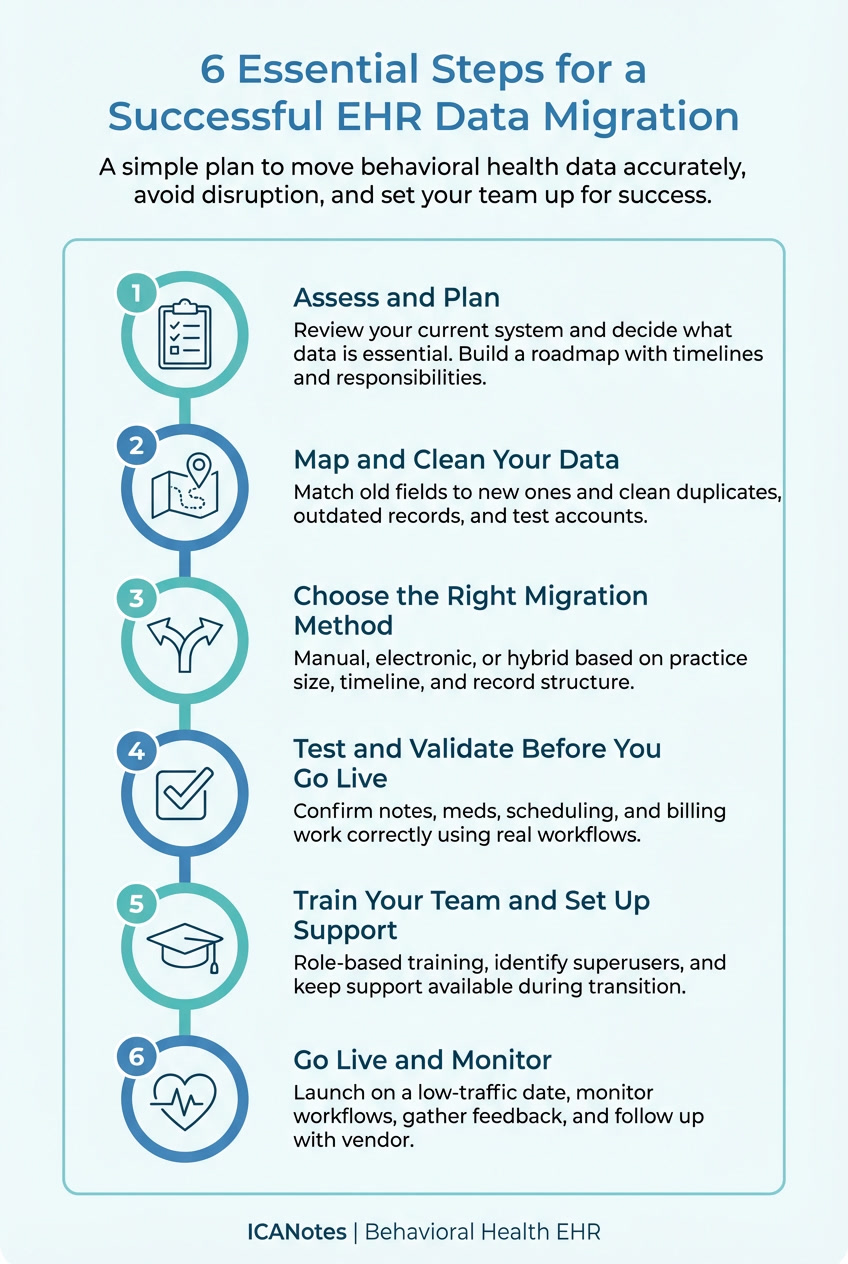
3. Choose the Right Migration Method
There are two main ways to migrate data: manually or electronically. Manual entry involves staff retyping key information into the new EHR. While time-consuming, it may work well for small practices or focused datasets.
Electronic migration moves data in bulk from one system to another, which is faster but requires careful testing to avoid formatting issues or data mismatches. Many behavioral health organizations use a hybrid approach, manually entering some data while electronically transferring the rest. The right choice depends on your practice size, timeline, and how structured your current records are.
4. Test and Validate Before You Go Live
Once your data is moved, it’s time to make sure everything works. Testing involves checking that clinical notes display properly, medication histories are intact, and appointment data appear as expected.
Ask clinicians and support staff to walk through real-life scenarios using the new system. Can they document a session? Update a treatment plan? Submit a bill? If anything looks off, you can fix it before the system goes live.
This stage helps prevent surprises and ensures your team feels confident ahead of the switch.
5. Train Your Team and Set Up Support
Your new EHR is only as effective as your team’s ability to use it. Start training early and tailor it to each role. Clinicians, billing staff, and front desk teams should each focus on the parts of the system they use most.
Many practices also identify “superusers” who receive extra training and serve as in-house resources during and after the transition. It can also help to keep the old system accessible for a short time during the changeover.
When staff feel prepared and supported, the entire migration becomes less stressful and more successful. High-quality training is essential to reduce frustration and ensure the system is easy to use. Several recent studies have shown that good training helps teams overcome usability challenges.
6. Go Live and Monitor
When your team is trained and your data is verified, it’s time to go live. Choose a date that avoids peak periods or known busy days, and make sure your vendor is available for support.
After launch, stay close to the process. Monitor how the system is working, gather staff feedback, and watch for any signs of workflow disruption. Schedule a follow-up with your vendor after a few weeks to review any questions, make adjustments, and ensure the system is working as expected.
Top Challenges in EHR Transition
Changing EHR systems comes with risks, especially for behavioral health practices handling sensitive, complex records. Knowing the most common challenges up front can help you plan ahead and protect patient care.
The table below highlights key issues and how to solve them.
| Challenge | How to Solve It |
|---|---|
| Data Loss or Corruption | Backup all data and test migrated records thoroughly. |
| Workflow Disruption | Stagger the go-live and train users in advance. |
| Poor Data Mapping | Involve clinical staff and subject matter experts. |
| Compliance Risks | Work with a CEHRT-certified vendor like ICANotes. |
| Staff Resistance | Emphasize benefits and assign migration champions. |
Data Loss or Corruption
Without proper checks, critical information like medication history or diagnoses can be lost during migration. Always back up your existing data and thoroughly test a sample dataset after migration. Use checksums, record counts, and clinical review to ensure data integrity.
Workflow Disruption
Going live with a new system without preparation can lead to patient delays, billing issues, or scheduling confusion. Avoid this by planning a phased transition, training staff early, and scheduling your go-live during periods of lower patient volume.
Poor Data Mapping
EHR systems often use different data structures and terminology. Incorrectly mapped fields can result in missing or mislabeled information. Involve clinical staff and technical experts to review how the fields in the old system align with the new one.
Compliance Risks
Behavioral health data is highly sensitive and must meet strict regulatory standards. During migration, even small gaps in documentation or data security can create compliance risks that affect audits, reimbursements, or patient trust.
ICANotes helps reduce those risks. As a CEHRT-certified and HIPAA-compliant EHR built for behavioral health, it includes secure cloud hosting, structured documentation, and reporting tools that support compliance before, during, and after migration.
Staff Resistance
Change can be difficult, especially when workflows and interfaces change. Help your team adapt by assigning internal champions, offering plenty of training time, and reinforcing how the new system will improve documentation, care, and job satisfaction.
Related: 7 EHR Problems and How to Fix Them
Make Your EHR Migration a Meaningful Upgrade
Switching to a new EHR is more than a technical task. It's a chance to improve daily workflows, support your staff, and deliver more connected care to your clients.
ICANotes is designed specifically for behavioral health providers. It combines structured documentation, secure patient portals, integrated billing, ePrescribing, and CEHRT certification in one easy-to-use platform.
Ready to get started?
You can begin a free trial, schedule a personalized demo, or contact our team to see how ICANotes can support a smooth and successful EHR migration.

Start Your 30-Day Free Trial
Experience the most intuitive, clinically robust EHR designed for behavioral health professionals, built to streamline documentation, improve compliance, and enhance patient care.
- Complete Notes in Minutes - Purpose-built for behavioral health charting
- Always Audit-Ready – Structured documentation that meets payer requirements
- Keep Your Schedule Full – Automated reminders reduce costly no-shows
- Engage Clients Seamlessly – Secure portal for forms, messages, and payments
- HIPAA-Compliant Telehealth built into your workflow


Frequently Asked Questions
Related Posts


Sanjiv Patel
Vice President of Product
Sanjiv Patel is Vice President of Product at ICANotes, where he leads the strategic development of behavioral health EHR and billing solutions. With over 20 years of experience in healthcare technology, Sanjiv has spearheaded major product initiatives that enhance clinical efficiency and provider outcomes. He holds CSM and CSPO certifications and is a graduate of Drexel University.